 Jyutping
Jyutping
Jyutping

Compatible systems: Windows 11 and Windows 10 (64-bit)
CPU support: x86_64 arm64
Download x86_64 version: jyutping-v0.3.0-x64.exe
Download ARM64 version: jyutping-v0.3.0-arm64.exe
# Bytes
27577567  jyutping-v0.3.0-x64.exe
27557556  jyutping-v0.3.0-arm64.exe

# SHA-256
2b3ed22c800036e612e1e2e88381ea28f32d784070ae202e996e57bfed64b2b9  jyutping-v0.3.0-x64.exe
0a92e26038d23415580d5aa535d1a3245cccdbe2b8cd0f888b7d2a83dc135db6  jyutping-v0.3.0-arm64.exe
While using Jyutping Input Method, right-click 中 in the bottom-right corner of the system taskbar to open the settings interface.
You can choose the character form standard, the number of candidates per page, the candidate font size, and more.
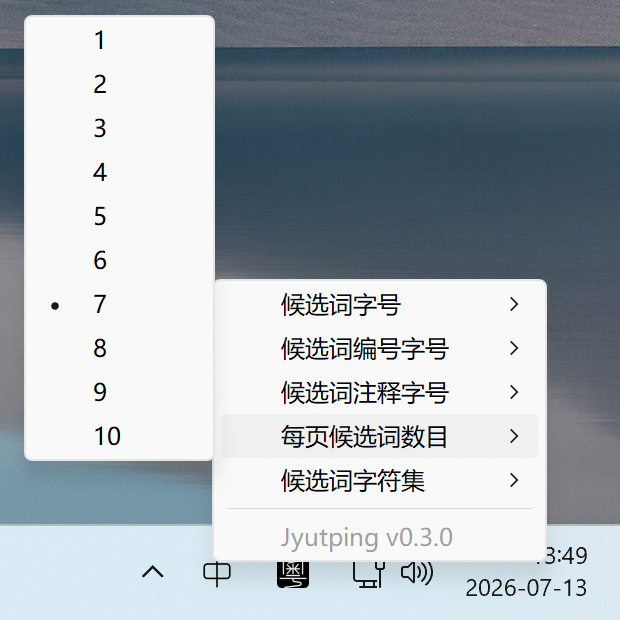
Jyutping Input Method uses many less common characters and words, and the fonts bundled with your computer may not display them completely or well.
We recommend installing all of the following fonts:
Inter
Shanggu Sans
Plangothic
MiSans L3
| Shortcut | Mode and character form |
|---|---|
| Shift | Toggle Chinese / ABC mode. |
| Shift + Space | Toggle full-width / half-width numbers and letters. |
| Ctrl + . | Toggle Chinese / English punctuation. |
| Ctrl + Shift + 1 | Switch to Traditional Chinese. |
| Ctrl + Shift + 2 | Switch to Traditional Chinese • Hong Kong standard. |
| Ctrl + Shift + 3 | Switch to Traditional Chinese • Taiwan standard. |
| Ctrl + Shift + 4 | Switch to Simplified Chinese. |
| Shortcut | Candidates and input |
|---|---|
| Arrow Up ↑ or Shift + Tab | Move to the previous candidate. |
| Arrow Down ↓ or Tab | Move to the next candidate. |
| - or [ or Arrow Left ← | Go to the previous candidate page. |
| = or ] or Arrow Right → | Go to the next candidate page. |
| Esc | Cancel the current candidate input. |
| Ctrl + Shift + Backspace | Remove the current candidate from input memory. |
Double-click C:\Program Files\Jyutping\unins000.exe to start uninstalling.
If the uninstaller says it cannot close an app during the process, try switching to a system input method first, then sign out and sign in again, or restart the computer, before uninstalling again.
To support development, donations are welcome.